Device registry
The device registry is a registry where Home Assistant keeps track of devices. A device is represented in Home Assistant via one or more entities. For example, a battery-powered temperature and humidity sensor might expose entities for temperature, humidity and battery level.
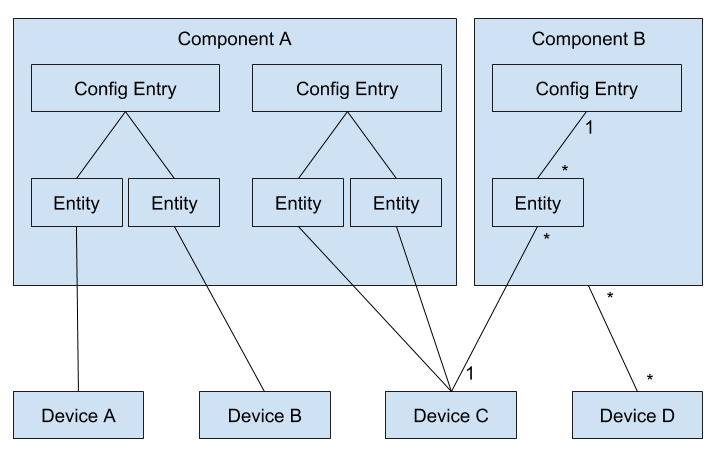
What is a device?
A device in Home Assistant represents either a physical device that has its own control unit, or a service. The control unit itself does not have to be smart, but it should be in control of what happens. For example, an Ecobee thermostat with 4 room sensors equals 5 devices in Home Assistant, one for the thermostat including all sensors inside it, and one for each room sensor.
If you connect a sensor to another device to read some of its data, it should still be represented as two different devices. The reason for this is that the sensor could be moved to read the data of another device.
A physical device that is supported by several integrations, and is therefore registered by several config entries, is represented by one device entry per config entry rather than a single shared device. Identifiers and connections, such as serial numbers or MAC addresses, are unique per config entry, so the same identifier registered by two config entries results in two separate device entries.
A device that offers multiple endpoints may be split into a parent device and multiple child devices. Typical examples of when a device should be split this way are smart power strips or smart multi-gang wall switches. The parent device will have entities representing the state of the power strip or multi-gang switch, for example network connection status and firmware update. The child devices will group entities tied to one of the channels, for example a switch entity and energy consumption sensor per channel. This allows the separate endpoints to be assigned to different areas in the building and it also allows logical grouping of entities. See Child devices for details.
Splitting one physical product into child devices is different from linking two separate physical products with via_device_id. via_device_id describes connectivity — how Home Assistant reaches a device, for example a hub and the devices behind it — whereas child devices describe composition — the logical parts of a single product.
Device properties
| Attribute | Description |
|---|---|
| area_id | The Area which the device is placed in. |
| config_entry_id | The id of the config entry that owns this device. A device belongs to a single config entry. |
| config_subentry_id | The id of the config subentry that owns this device, or None. A device belongs to at most one config subentry. |
| configuration_url | A URL on which the device or service can be configured, linking to paths inside the Home Assistant UI can be done by using homeassistant://<path>. |
| connections | A set of tuples of (connection_type, connection identifier). Connection types are defined in the device registry module. Each item in the set uniquely defines a device entry within its config entry, meaning another device of the same config entry can't have the same connection. |
| created_at | The point in time the device was created, managed by the device registry. |
| disabled_by | Set if the device is disabled, indicating who or what disabled it (a DeviceEntryDisabler enum member), otherwise None. |
| entry_type | The type of entry. Possible values are None and DeviceEntryType enum members (only service). |
| hw_version | The hardware version of the device. |
| id | Unique ID of device (generated by Home Assistant) |
| identifiers | Set of (DOMAIN, identifier) tuples. Identifiers identify the device in the outside world. An example is a serial number. Each item in the set uniquely defines a device entry within its config entry, meaning another device of the same config entry can't have the same identifier. |
| labels | The labels assigned to the device. |
| name | Name of this device |
| name_by_user | The user configured name of the device. |
| manufacturer | The manufacturer of the device. |
| parent_device_id | For a child device, the id of its parent device. Only child devices (ChildDeviceEntry) carry this attribute; the serialized (WebSocket) representation additionally reports parent_device_id as null for main devices. |
| model | The model name of the device. |
| model_id | The model identifier of the device. |
| modified_at | The point in time the device was last modified, managed by the device registry. |
| serial_number | The serial number of the device. Unlike a serial number in the identifiers set, this does not need to be unique. |
| sw_version | The firmware version of the device. |
| via_device_id | The device id of a device that routes messages between this device and Home Assistant. An example of such a device is a hub. This is used to show device topology in Home Assistant. To model the logical parts of a single product, use a child device instead. |
Defining devices
A device is registered automatically from an entity's device_info (see below) or manually. In both cases the registry matches the registration against the existing devices of the same config entry, by identifiers first and then by connections. Only one identifier or connection needs to match for the registration to be treated as the same device; any other supplied identifiers and connections are then added to that device. Registering an identifier or connection that already belongs to a different device of the same config entry is a collision and raises an error.
Automatic registration through an entity
Entity device info is only read if the entity is loaded via a config entry and the unique_id property is defined.
Each entity is able to define a device via the device_info property. This property is read when an entity is added to Home Assistant via a config entry. Identifiers and connections are unique per config entry, so the device is always matched within the config entry the entity belongs to, using the supplied identifiers or connections, like serial numbers or MAC addresses.
# Definition of DeviceInfo TypedDict
class DeviceInfo(TypedDict, total=False):
    """Entity device information for device registry."""

    configuration_url: str | URL | None
    connections: set[tuple[str, str]]
    created_at: str
    entry_type: DeviceEntryType | None
    identifiers: set[tuple[str, str]]
    manufacturer: str | None
    model: str | None
    model_id: str | None
    modified_at: str
    name: str | None
    serial_number: str | None
    suggested_area: str | None
    sw_version: str | None
    hw_version: str | None
    translation_key: str | None
    translation_placeholders: Mapping[str, str] | None
    via_device_id: str

# Inside a platform
class HueLight(LightEntity):
    @property
    def device_info(self) -> DeviceInfo:
        """Return the device info."""
        return DeviceInfo(
            identifiers={
                # Serial numbers are unique identifiers within a specific domain
                (hue.DOMAIN, self.unique_id)
            },
            name=self.name,
            manufacturer=self.light.manufacturername,
            model=self.light.productname,
            model_id=self.light.modelid,
            sw_version=self.light.swversion,
        )
To link the device to the via device it connects through — such as a hub — set via_device_id to the via device's Home Assistant device id. That id isn't known until the via device has been registered, so it is obtained in one of two ways.
Look it up from the via device's identifiers with async_get_device_id_by_identifier, for example inside the device_info property:
class HueLight(LightEntity):
    def __init__(self, config_entry: ConfigEntry, light: Light) -> None:
        """Initialize the light."""
        self._config_entry = config_entry
        self.light = light

    @property
    def device_info(self) -> DeviceInfo:
        """Return the device info."""
        return DeviceInfo(
            identifiers={(hue.DOMAIN, self.light.unique_id)},
            name=self.light.name,
            via_device_id=dr.async_get_device_id_by_identifier(
                self.hass,
                (hue.DOMAIN, self.light.bridge_id),
                config_entry_id=self._config_entry.entry_id,
            ),
        )
Or, when the integration already knows the via device's id — typically because it created the via device itself and kept the returned DeviceEntry — pass the id to the entity and set _attr_device_info in the constructor:
class HueLight(LightEntity):
    def __init__(self, light: Light, bridge_device_id: str) -> None:
        """Initialize the light."""
        self.light = light
        self._attr_device_info = DeviceInfo(
            identifiers={(hue.DOMAIN, light.unique_id)},
            name=light.name,
            via_device_id=bridge_device_id,
        )
Manual registration
Components are also able to register devices in the case that there are no entities representing them. An example is a hub that communicates with the lights.
# Definition of DeviceRegistry.async_get_or_create:
class DeviceRegistry(BaseRegistry[dict[str, list[dict[str, Any]]]]):
    ...

    @callback
    def async_get_or_create(
        self,
        *,
        config_entry_id: str,
        config_subentry_id: str | None | UndefinedType = UNDEFINED,
        configuration_url: str | URL | None | UndefinedType = UNDEFINED,
        connections: set[tuple[str, str]] | None | UndefinedType = UNDEFINED,
        created_at: str | datetime | UndefinedType = UNDEFINED,  # will be ignored
        # To disable a device if it gets created
        disabled_by: DeviceEntryDisabler | None | UndefinedType = UNDEFINED,
        entry_type: DeviceEntryType | None | UndefinedType = UNDEFINED,
        hw_version: str | None | UndefinedType = UNDEFINED,
        identifiers: set[tuple[str, str]] | None | UndefinedType = UNDEFINED,
        manufacturer: str | None | UndefinedType = UNDEFINED,
        model: str | None | UndefinedType = UNDEFINED,
        model_id: str | None | UndefinedType = UNDEFINED,
        modified_at: str | datetime | UndefinedType = UNDEFINED,  # will be ignored
        name: str | None | UndefinedType = UNDEFINED,
        serial_number: str | None | UndefinedType = UNDEFINED,
        suggested_area: str | None | UndefinedType = UNDEFINED,
        sw_version: str | None | UndefinedType = UNDEFINED,
        translation_key: str | None = None,
        translation_placeholders: Mapping[str, str] | None = None,
        via_device_id: str | None | UndefinedType = UNDEFINED,
    ) -> DeviceEntry:
        ...

# Inside a component
from homeassistant.helpers import device_registry as dr

device_registry = dr.async_get(hass)

device_registry.async_get_or_create(
    config_entry_id=entry.entry_id,
    connections={(dr.CONNECTION_NETWORK_MAC, config.mac)},
    identifiers={(DOMAIN, config.bridgeid)},
    manufacturer="Signify",
    suggested_area="Kitchen",
    name=config.name,
    model=config.modelname,
    model_id=config.modelid,
    sw_version=config.swversion,
    hw_version=config.hwversion,
)
Looking up devices
Inside an entity, prefer self.device_entry over looking the device up in the registry.
To find a device in the registry, scope the lookup to the config entry that owns it. Because identifiers and connections are unique per config entry rather than globally, a single identifier or connection is not enough to point to a single device on its own.
from homeassistant.helpers import device_registry as dr

device_registry = dr.async_get(hass)

# By Home Assistant device id
device = device_registry.async_get(device_id)

# By one identifier, scoped to the owning config entry
device = device_registry.async_get_device_by_identifier(
    (DOMAIN, serial_number), entry.entry_id
)

# By one connection, scoped to the owning config entry
device = device_registry.async_get_device_by_connection(
    (dr.CONNECTION_NETWORK_MAC, mac), entry.entry_id
)
These methods return main devices. To look up a child device by one of its identifiers, use async_get_child_device_by_identifier(identifier, config_entry_id).
To set via_device_id, resolve the via device's Home Assistant device id from its identifiers with the module-level helper async_get_device_id_by_identifier. The lookup is unambiguous because identifiers are unique within a config entry, and it raises ValueError if no matching device exists, so only call it once the via device has been created. When your integration creates the via device itself, skip the lookup and read .id from the DeviceEntry that async_get_or_create returned.
via_device_id = dr.async_get_device_id_by_identifier(
    hass, (DOMAIN, hub_serial_number), config_entry_id=entry.entry_id
)
To find the device together with the config entry a given integration owns for it, use async_get_device_and_config_entry_for_domain. It returns (None, None) when device_id is unknown or refers to a child device, and (device, None) when the device exists but no config entry of domain owns it, so check both values before using them:
device, config_entry = dr.async_get_device_and_config_entry_for_domain(
    hass, device_id, domain=DOMAIN
)
if device is not None and config_entry is not None:
    ...
To get every main device matching an identifier or connection, possibly across config entries, use DeviceRegistry.async_get_devices(), which returns a list.
Child devices
Child devices are a new feature and the design is still being finalized. The API and behavior described here may change.
A child device is a lightweight sub-device that models a logical part of a single physical product, for example one outlet of a smart power strip or one gang of a multi-gang wall switch. Use a child device to split a product whose parts should be grouped separately or placed in different areas, and reserve via_device_id for connectivity between separate physical products, such as a hub and the devices behind it.
A child device:
- Belongs to a single parent device, referenced by the parent's device id (
parent_device_id). - Belongs to the same config entry and config subentry as its parent.
- Has no connectivity or hardware identity of its own — it carries no
connections,via_device_id,manufacturer,model, firmware versions or serial number. Those belong to the physical parent device. - Inherits its parent's area unless it is given an area of its own.
Child devices are a single level: a child device can't be the parent of another child device.
Like any device, a child device is registered either automatically through an entity or manually.
Registering a child device through an entity
For a child device created implicitly by its entities, return a ChildDeviceInfo from the entity's device_info property with parent_device_id set to the parent's device id. ChildDeviceInfo is a lighter counterpart to DeviceInfo carrying only the fields that apply to a child:
# Definition of ChildDeviceInfo TypedDict
class ChildDeviceInfo(TypedDict, total=False):
    """Entity device information for a child device in the device registry."""

    created_at: str
    identifiers: Required[set[tuple[str, str]]]
    modified_at: str
    name: str | None
    parent_device_id: Required[str]
    suggested_area: str | None
    translation_key: str | None
    translation_placeholders: Mapping[str, str] | None

# Inside a platform
class OutletSwitch(SwitchEntity):
    @property
    def device_info(self) -> ChildDeviceInfo:
        """Return the child device info."""
        return ChildDeviceInfo(
            identifiers={(DOMAIN, f"{self._strip_id}_outlet_{self._outlet}")},
            name=f"Outlet {self._outlet}",
            parent_device_id=self._parent_device_id,
        )
identifiers and parent_device_id are required. An entity's device_info may return either a DeviceInfo or a ChildDeviceInfo; a non-None parent_device_id is what makes the entity register a child device. The parent_device_id is the parent's Home Assistant device id (DeviceEntry.id), not its identifiers, so the parent device must already be registered.
Registering a child device manually
For a child device that isn't represented by an entity, register it on the device registry with async_get_or_create_child:
# Definition of DeviceRegistry.async_get_or_create_child
def async_get_or_create_child(
    self,
    *,
    config_entry_id: str,
    config_subentry_id: str | UndefinedType | None = UNDEFINED,
    disabled_by: DeviceEntryDisabler | UndefinedType | None = UNDEFINED,
    identifiers: set[tuple[str, str]],
    name: str | UndefinedType | None = UNDEFINED,
    parent_device_id: str,
    suggested_area: str | UndefinedType | None = UNDEFINED,
    translation_key: str | None = None,
    translation_placeholders: Mapping[str, str] | None = None,
) -> ChildDeviceEntry:
    """Get child device. Create if it doesn't exist."""

# Inside a component
from homeassistant.helpers import device_registry as dr

device_registry = dr.async_get(hass)

# The parent device must be registered first
parent = device_registry.async_get_or_create(
    config_entry_id=entry.entry_id,
    identifiers={(DOMAIN, strip_id)},
    manufacturer="Example",
    name="Power strip",
)

# Register each outlet as a child of the power strip
outlet = device_registry.async_get_or_create_child(
    config_entry_id=entry.entry_id,
    parent_device_id=parent.id,
    identifiers={(DOMAIN, f"{strip_id}_outlet_1")},
    name="Outlet 1",
)
config_entry_id, identifiers and parent_device_id are required. There is deliberately no via_device_id, connections, manufacturer, model or firmware parameter — a child device does not carry those.
The parent must already exist (the registry never auto-creates it), must be registered by the same config entry, and must belong to the same config subentry. If the parent belongs to a config subentry, pass its config_subentry_id explicitly: it is not inherited, and omitting it defaults to no subentry, which raises DeviceInfoError. The parent must itself be a main device — passing a child device's id as parent_device_id is rejected, since children can't be nested.
Converting a device to a child
If the identifiers passed to async_get_or_create_child, or the identifiers of a child's device_info, match an existing device of the same config entry, that device is converted to a child device in place, keeping its id. This is useful when migrating an already-split integration to child devices: registering each part with the identifiers it already had turns it into a child of the parent without changing its device id, so device-based automations keep working.
Converting the other direction — turning a child device back into a main device — is not supported directly. There is no parent_device_id parameter on async_update_child_device, reparenting is rejected, and calling async_get_or_create with a live child's identifiers raises rather than promoting the child.
To do it indirectly, remove the child device and then recreate it as a main device with async_get_or_create, passing the same identifiers the deleted child had:
# Remove the child device first...
device_registry.async_remove_device(child.id)

# ...then recreate it as a main device with the same identifiers
device_registry.async_get_or_create(
    config_entry_id=entry.entry_id,
    identifiers={(DOMAIN, outlet_id)},  # same identifiers the child had
    name="Outlet 1",
)
The order matters: the child must be removed before its identifiers are free to be registered as a main device.
Child device lifecycle
Child devices follow their parent:
- Deletion cascades. Removing a parent device removes its child devices with it.
- Disabling cascades. Disabling a parent disables its children; enabling the parent re-enables the children it had disabled. A child of a disabled parent can't be enabled on its own.
- Area is inherited. A child with no area of its own reports its parent's area; setting an area on the child overrides that. Use
dr.async_get_effective_area_id(hass, device)to get the effective area of a device or child device. - Labels are not inherited; they stay explicit per device.
- A parent with children can't be moved to another config entry or subentry.
- Targeting a parent targets its children. When a device is used as the target of an action, target resolution expands a parent device to the entities of the parent and of all its child devices; a child device resolves to only its own entities. This means device-targeted automations keep working when an integration breaks entities out of a device onto child devices.
Looking up child devices
Several registry helpers are available for child devices:
dr.async_entries_for_parent_device(device_registry, parent_device_id)returns the children of a device.device_registry.async_get_child_device_by_identifier(identifier, config_entry_id)looks up a child device by one of its identifiers, scoped to a config entry.device_registry.async_get(device_id, include_child_devices=..., include_main_devices=...)can be scoped to resolve only main devices or only child devices.
Removing devices
Integrations can opt in to allow the user to delete a device from the UI. To do this, integrations should implement the function async_remove_config_entry_device in their __init__.py module.
async def async_remove_config_entry_device(
    hass: HomeAssistant, config_entry: ConfigEntry, device_entry: DeviceEntry
) -> bool:
    """Remove a config entry from a device."""
When the user clicks the delete device button for the device and confirms it, async_remove_config_entry_device will be awaited and if True is returned, the device will be removed from the device registry. A device belongs to a single config entry, so removing that config entry from the device removes the device.
In async_remove_config_entry_device the integration should take the necessary steps to prepare for device removal and return True if successful. The integration may optionally act on EVENT_DEVICE_REGISTRY_UPDATED if that's more convenient than doing the cleanup in async_remove_config_entry_device.